
Proposed Business Processes
Business Process Description
The scope of this project is to move the following folders into the new document management system:
- EBLDGS folders – this includes all Building folders, plus Technical Services and Finance folders
- New Projects folders
- EST folder
- EB15 subfolder O&M (Operations and Manuals) only
- The remaining Admin folders under EB15 are not included in the scope of this project but may be in the future and should be accounted for in this project in terms of size required.
EB15 Folder
EB15 houses the documentation for the day to day running of Estates such as Administrative and Goverence documentation. Currently the folders are split into years so EB15 is the 2015 folder (last year was EB14). It is likely that on moving forward into the new system this folder will become known as Admin rather than by splitting into years.
For moving to the new system the current size of EB14 should be measured as it will hold the full years documentation (EB15 just has a couple of months’ worth of documentation so far
E&B will provide the size of EB14 folder by the time Design commences.
This folder in its entirety is not in scope for this project. E&B just need the space set up so they must be able to add the documentation in this folder and any subfolders in the future and be able to create, edit and delete folders as required. Everyone in Estates be able to view the folders and documents under EB15 but E&B will need to decide who can create, edit and delete. External users can never access EB15.
The reason it is not in scope at present is that E&B require to consolidate the documentation in this folder before moving it. E&B will therefore also migrate the EB15 folder to the new system manually.
The retention on this folder should be permanent.
EBLDGS Folder
The current size of EBLDGS is 500GB (as of March 2015)
Current EBLDGS structure is as follows:

Figure 1: Current EBLDGS folder structure
- There are 766 buildings which E&B are responsible for - each building has its own unique building number (e.g. Old College is 1; St Cecelia’s is 301). The building numbers come from Archibus FM, the space module for buildings.
- Each building is listed under the EBLDGS document structure separately. Each buildings has a specific list of folders holding the documentation required for each building. These folders are:
- Building Profile
- Correspondence
- Data and Telephones
- Facilities and Access
- Health and Safety
- Health and Safety file
- Historic Drawings
- Insurance
- Lease
- Multiple Occupancy
- Projects
- Records Drawings
- Support Services
- Works Maintenance
- Q&M Manuals
- E&B are currently looking into restructuring and streamlining these folders in the EBLDGS folder. In the meantime the folders can stand as is as long as Estates will be able to amend and restructure the folders themselves.
- The building number for existing buildings never changes but new buildings can be added, existing buildings decommissioned. Decommissioned building numbers should not be reused.
- There is currently a Sold and Demolished properties folder under EBLDGS but E&B have confirmed (at meeting of 2 April) that they are happy for these folders to be archived. Therefore decommissioned building documentation should be archived under their existing building number.
- It should be easy to for E&B to add new folders at building level.
- All E&B would be able to view/edit/upload documents to EBLDGS building number folders, with the exception of the Historic Drawings and Record Drawings folders which should be view/edit/upload by Space Management team only with everyone else being View only – it is important that these documents are managed solely by the Space Management team so that changes are not made to the documents unnecessarily. These drawings must remain on their own specific drive as they plug into Archibus. The deletion of folders and files will be through an E&B administrative function (Admin function to be determined by E&B).
- Some UoE staff should be able to access specific EBLDGS folders (for example Procurement, IS Asbestos records, IS Programme Manager etc.) E&B should be able to set permissions for UoE staff to access folders.
- As well as the buildings folders there are two other folders that require to be set up:
- Technical Services
- Finance
- These are currently housed under EBLDGS folder but in the new document management system they should come under Administration (current EB15)
- There should be a proof of concept to set up one area within EBLDGS to see how much time would be required to migrate folders manually or how much work would be required to set up automated migration (folders would need to be set up in advance).
Projects Folder
The Projects folder is a folder under each building in the EBLDGS folder. Steven Poliri of E&B Estates Development has already created a new document structure for these folders and already is moving some current physical documentation into this structure. The new document management system should follow this set up.
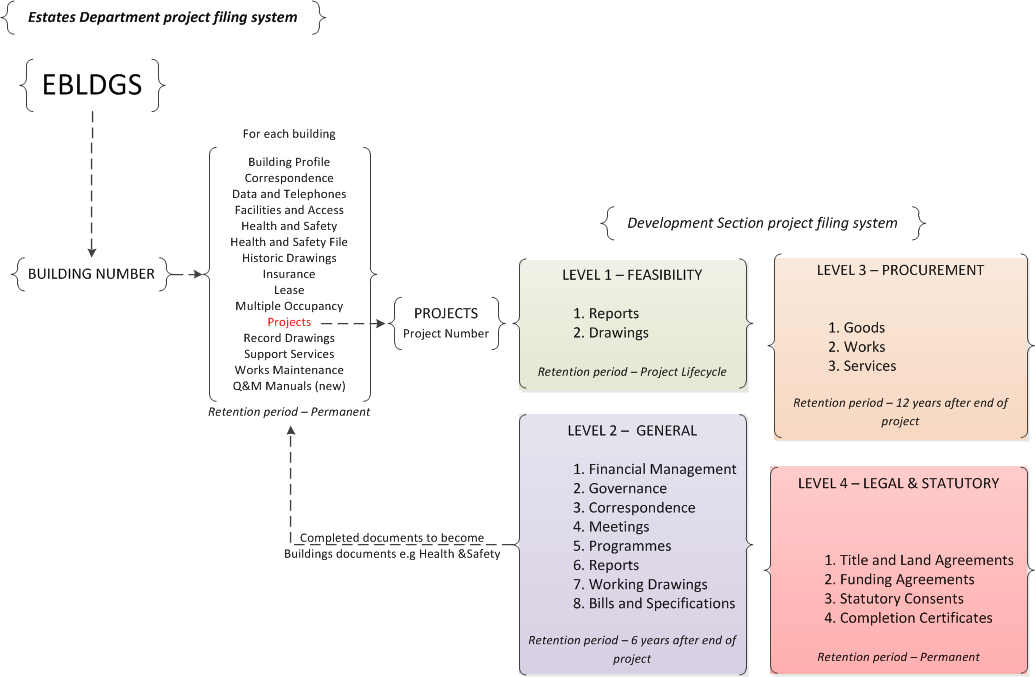
Figure 2 Proposed document structure
EBLDGs building number > Projects > Project > Levels 1-4 (Feasibility, General, Procurement, Legal & Statutory) > individual sections within Levels
A documented version of the projects folders is to be found in Appendix 1
- It should be easy to for E&B to add new folders at project level
- The Level 5 temporary file must be able to continue to update the appropriate Building folder under EBLDGS
- External users (such as architects, quantity surveyors, Contractors, Subcontractors, Design team) should be able to access specific folders and documents in the Projects area for their specific projects.
- For this project the EBLDGS folder should be created for E&B within the Estates folder but it is anticipated that E&B will be able to easily set up their own folders at the same level as EBLDGS in the future.
- Within EBLDGS folder it is anticipated that E&B will be able to easily set up their own building number folders, projects folders and sub folders (Levels 1-5).
- Each building will be able to have more than one project and each project under the projects folder will have its own unique project number (currently in use is for example St Cecelia’s = 0301A1 - with 301 being building code and A1 being the project phase).
- The deletion of project folders and files will be through project manager and/or an E&B administrative function (administrator function to be determined by E&B).
- At project level an E&B administrative function (to be determined by E&B) will be able to add, edit and delete users and user groups for each project/project Level for access for users within and outwith E&B. E&B will complete a user matrix for themselves so the administrators can easily determine the permissions to allocate within each area. E&B have been advised by IS to keep the matrix simple so it is easy to manage.
- Each building has a variety of documentation attached to it ranging from feasibility reports which can be destroyed when a project ends to Title and Land Agreements which can never be destroyed.
- E&B require a new document management system to be able to have version control on documents, to check documents in and out thereby preventing overwriting and allow users to share their documents with other users. It should also be easy for users to upload documents to the new system and to search for documents easily.
- E&B were particularly concerned about how a document management system would manage the following
- Retention: storage of documents was time dependant so retention periods will be set on folders ranging from deleting at end of project to never deleting
- E&B require evidence of payments up to 10 years after the time so invoice needs to be retained – these invoices currently reside in Serengeti so how would they be managed. Liz Torrance of Estates Finance was able to confirm that there should be no requirement to hold invoices/credit notes within EDLDGS as they are currently held in both these locations:
1. EBIS - held in Serengeti and viewed via e-intranet
2. Efinancials - held in Serengeti and viewed via e-intranet
As Estates already has this duplication it would be inefficient to hold the documents in yet another location. E&B can currently see these invoices through their e-intranet and will continue to do so as it is outwith a document management system. Liz was also able to confirm that copies will be held for 10 years or more in Serengeti (Estates Finance will be looking into whether they can put something in place to archive, rather than keep scanning and holding the copies in the "live" system).
- E&B can be legally bound to keep a document for a specific number of years but sometimes it will be housed elsewhere. This happens mainly in titles and deeds – these documents come in the form of scanned in documents. They could therefore be stored under level 4 of the new structure therefore never being destroyed.
- There is no requirement to interface the new document management system with other UoE systems.
File naming conventions
- It is considered by E&B that it would be too difficult to implement file naming conventions at present due to many backgrounds of users/practices. However it is highly recommended that E&B consider taking forward a file-naming convention as it means that documents will be easy to identify, easy to sort, and they will be easy to locate especially when there are long retention periods. It will make it easier to search for, or share, a document if file naming conventions are utilised.
BIM
- BIM is 3D modelling of buildings and are viewed in their entirety. While the Scottish Government has yet to make a decision on whether BIM models are mandatory for government funded projects E&B currently have 2/3 projects with BIM running and they expect in 5 years every project will have a BIM requirement. The size of BIM models is a problem as they can be very large so could cause an issue for uploading. E&B have confirmed that the current E&B BIM models are around 500MB to 1GB. However E&B have said they can be handled outwith the document management system within their current practices if they cannot be uploaded into a new system.
Migration of current documentation to document management system
- E&B are looking to migrate Live folders or anything completed in the last 5 years. To do automatically would require mapping between the old system and the new and to take advantage of the automatic process E&B will tidy up their documentation and provide a mapping plan for migration. Anything that cannot fit into the mapping will have to be migrated manually.
- Anything before 5 years should be archived and E&B will manually migrate once everything is set up.